SelectionPulseExtension


A deck.gl layer extension that pulses the color of selected objects on the GPU.
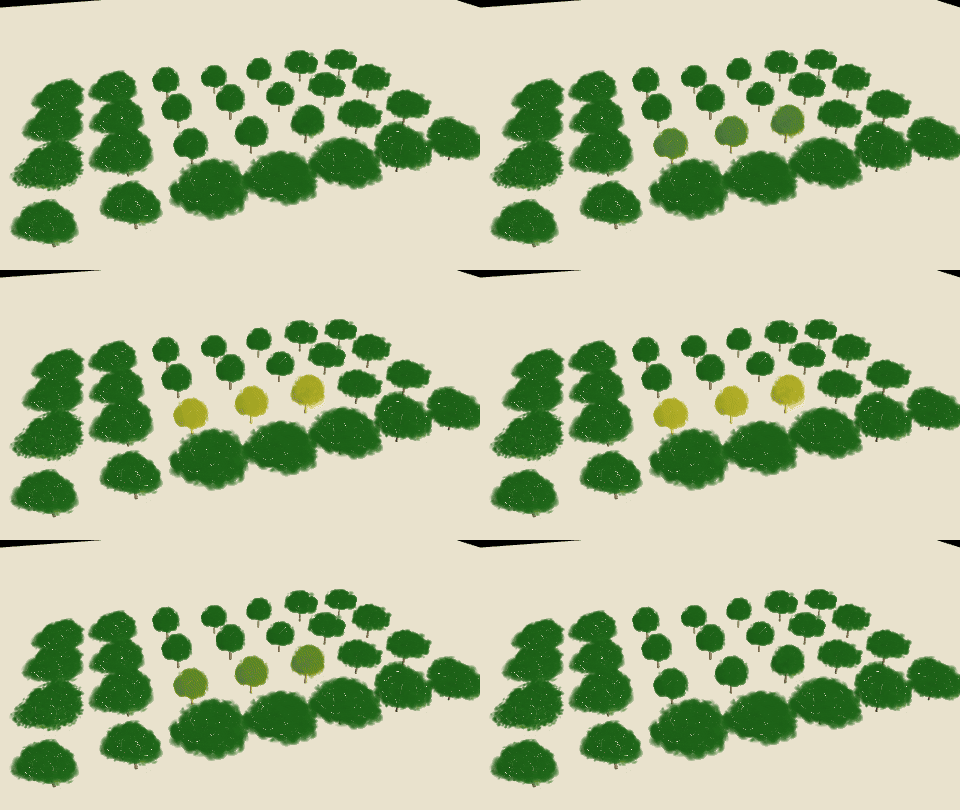
Selection is a per-object value written from getSelected; the pulse itself is two uniforms. A
selection change writes one value per object, and each animation frame only updates the uniforms:
while the selection pulses, no accessor reruns and no attribute is uploaded.
import {ScatterplotLayer} from '@deck.gl/layers';
import {SelectionPulseExtension, TreeLayer} from '@deck.gl-community/layers';

const selectionPulse = new SelectionPulseExtension();

new ScatterplotLayer({
  id: 'sites',
  data: sites,
  getPosition: d => d.position,
  getFillColor: d => colorForCategory(d),
  extensions: [selectionPulse],
  getSelected: d => selectedIds.has(d.id),
  updateTriggers: {getSelected: [selectedIds]}
});

new TreeLayer({
  id: 'grove',
  data: trees,
  getTree: d => d.tree,
  extensions: [selectionPulse],
  getSelected: d => selectedIds.has(d.id),
  updateTriggers: {getSelected: [selectedIds]},
  pulseColor: [255, 205, 40],
  pulseStrength: 0.6
});
Properties
getSelected (Accessor<boolean | number>, optional)
Whether each object is selected. true or 1 pulses it fully, false or 0 leaves its color
unchanged, and values in between pulse it partly. Default false.
As with any deck.gl accessor, a new function does not rerun it: change updateTriggers.getSelected
when the selection changes.
pulseColor (Color, optional)
The RGB that selected objects blend toward at the peak of each pulse. Alpha is ignored; objects
keep their own alpha. Default [0, 0, 0], which dims them.
pulseStrength (number, optional)
The blend toward pulseColor at the peak, from 0 to 1. Default 0.4: with the default color, a
selected object dims to 60% of its brightness and back.
pulsePeriod (number, optional)
Milliseconds per pulse. 0 holds a steady tint at pulseStrength and requests no redraws.
Default 1500.
pulsePhase (number, optional)
Offset into the pulse as a fraction of pulsePeriod. Default 0.
pulseTime (number | null, optional)
The pulse clock in milliseconds. null follows deck.gl's animation timeline (context.timeline);
a number renders that instant, for example in tests and screenshots. Default null.
Animation
The blend at time t is pulseStrength * (1 - cos(2π (t / pulsePeriod + pulsePhase))) / 2: it
starts at the object's own color, reaches pulseStrength after half a period and returns.
While pulseTime is null and any object a layer draws is selected, that layer requests a redraw
on every frame. With nothing selected, a numeric pulseTime or a pulsePeriod of 0, it requests
none. In an interleaved MapboxOverlay on a MapLibre or Mapbox map, the request repaints the map.
Shading, lighting and picking
The color is blended in the vertex shader at deck.gl's DECKGL_FILTER_COLOR hook. On meshes lit
per fragment, such as SimpleMeshLayer and TreeLayer, the lighting then shades the blended color;
on layers lit per vertex, such as ColumnLayer, it blends the lit color. With the default dark
pulseColor both give the same dimming.
The extension composes with LightingEffect, including shadow-casting lights: pulsing objects
keep casting shadows, and the shadows do not pulse. Picking is unaffected, and autoHighlight or
highlightedObjectIndex draws highlightColor over the pulsing color.
Supported layers
Verified in WebGL2 render tests:
| Layer | Notes |
|---|---|
ScatterplotLayer, ColumnLayer, PointCloudLayer, IconLayer, TextLayer | |
PathLayer, LineLayer, ArcLayer | Also with PathStyleExtension dashes. |
SolidPolygonLayer, PolygonLayer, GeoJsonLayer | Fills, extrusions and outlines. |
SimpleMeshLayer | |
TreeLayer, SplatLayer | Also on WebGPU. SplatLayer with transparency: 'sorted' does not pulse. |
Other deck.gl layers whose vertex shader calls DECKGL_FILTER_COLOR work the same way, as do
custom layers that call it. Composite layers pass the extension to their sub-layers and apply
getSelected to their own data rows, so getSelected receives the original object. It composes
with extensions such as DataFilterExtension.
Not supported:
TripsLayerin deck.gl 9.4: its shaders replace the injections of every extension.- Aggregation layers such as
HexagonLayerandHeatmapLayer, which draw bins rather than objects. - deck.gl's core layers on WebGPU: deck.gl 9.4 has no WGSL color hook. The extension logs a warning and leaves them unchanged.
SplatLayer's Gaussians and TreeLayer's wood, crops and canopy already use the 16 vertex
attributes that WebGL2 and WebGPU guarantee, so on those layers the extension reads the selection
from a small texture by instance index instead of from a vertex attribute.
Adding and removing the extension
deck.gl initializes extensions when it creates a layer. SelectionPulseExtension also initializes
when it is added to an existing layer. deck.gl does not finalize an extension removed from a live
layer, so keep it on the layer and stop the pulse with getSelected or pulseStrength: 0, or
give the layer a new id when you remove it.
Migrating from accessor-driven pulses
Rebuilding a layer on each animation frame with a pulse value in a color accessor's
updateTriggers reruns that accessor and re-uploads the color of every object on every frame. Move
the selection to getSelected and keep the color accessor's triggers to the inputs that change
colors:
// Before: every visible object is recolored on every frame.
getFillColor: d => (selectedIds.has(d.id) ? dim(baseColor(d), pulse) : baseColor(d)),
updateTriggers: {getFillColor: [colorTheme, selectedIds, pulse]}

// After: colors are written once; the selection pulses on the GPU.
getFillColor: baseColor,
extensions: [new SelectionPulseExtension()],
getSelected: d => selectedIds.has(d.id),
updateTriggers: {getFillColor: [colorTheme], getSelected: [selectedIds]}